Get a Roofing Lead Page Installed on Your WordPress Website (Done for You, $397)
Jay installs a roofing lead page with a ballpark quote calculator on your existing WordPress website for $397, one time. Your business name, service area, roofing services, colors, and a big call button, set up on mobile and desktop. No rebuild. No code for you to touch.
Call or text Jay at 608-322-4081. Send your website address and say you do roofing, and he’ll tell you if your site is a good fit.
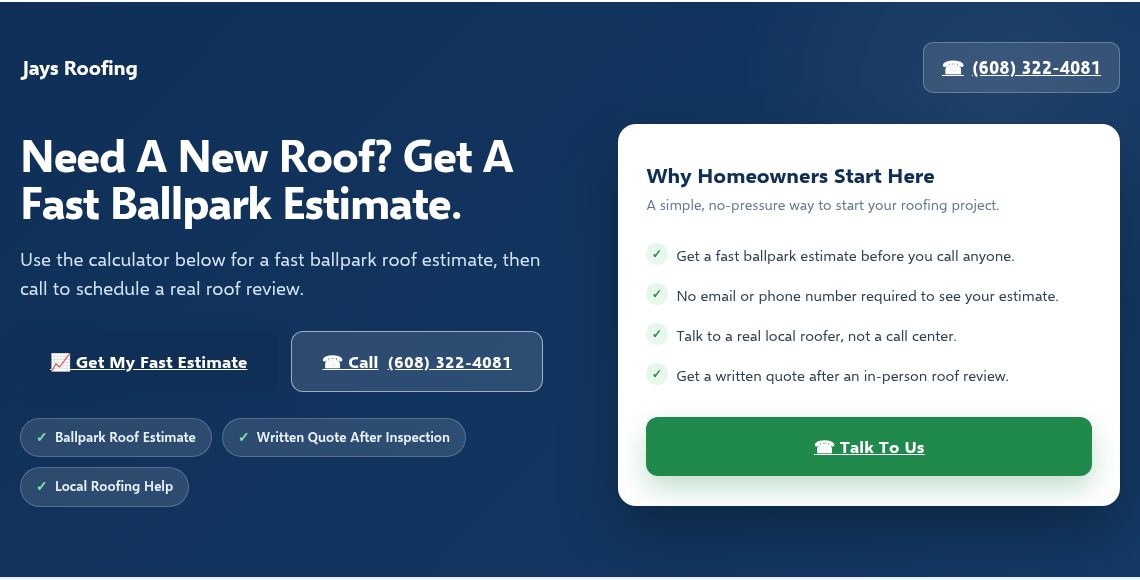
Most roofing contractor websites have a basic contact page that says “fill out this form and we’ll get back to you.” That worked ten years ago. Today, when a homeowner searches “roof replacement cost” or “roofer near me,” they land on your site, see nothing useful, and bounce to the next contractor who makes it easy to get information.
Your website doesn’t need a complete rebuild. It needs one page that does the heavy lifting: a roofing lead page with a built-in quote calculator that gives homeowners a ballpark estimate, shows them your services, and makes it obvious how to call you. That’s what this service installs on your existing WordPress site.
Quick Fit Check: Is This for Your Roofing Company?
This service is built for a specific situation. Here’s who it works for:
- You already have a WordPress website. It doesn’t matter if it’s basic or professional. As long as it runs on WordPress, Jay can add the roofing lead page to it. You don’t need to rebuild anything else.
- You do roofing work. Residential re-roofing, commercial flat roof systems, storm damage repair, shingle replacement, metal roofing, gutter work, emergency tarping. The page is configured for your specific roofing services.
- You want homeowners to get a quick ballpark estimate on your website. Instead of a blank contact form, visitors can enter their roof size, material preference, and other details to see an estimated range. Then they call you.
- You don’t want to do the technical work yourself. No coding, no plugin conflicts, no figuring out how WordPress page builders work. Jay handles the installation, configuration, and mobile layout.
- You want more phone calls from your website. The page is designed so the next step after seeing an estimate is to call or text your number. That’s the entire goal.
If you’re nodding at most of those, text Jay your website URL and he’ll take a look.
How This Works for Roofing Contractors
Jay recorded a short video explaining what the lead page and calculator do, how the installation process works, and what roofing contractors can expect. If you’d rather watch than read, start here.
Can’t watch right now? Open the video on YouTube for later. Or just keep reading. Everything Jay covers in the video is explained below in detail.
What a Homeowner Sees When They Land on Your Roofing Lead Page
Picture this: a homeowner in your service area just noticed their roof is leaking after a storm. They search “roof replacement cost” on their phone. They find your website and land on the lead page.
Here’s what they see, top to bottom:
Your roofing company name and service area are right at the top. They know immediately this is a local roofer, not a national directory. Below that, your page lists the types of roofing work you handle: residential shingle replacement, metal roofing, flat roof systems, storm damage repair, gutter installation, whatever your company actually does.
Then they see the roofing quote calculator. It asks straightforward questions: How big is your roof (square feet)? What material are you interested in? Is there an existing layer that needs to be torn off? What’s the pitch? How many stories? The homeowner picks from dropdown menus. No account creation. No email required. No salesperson calling them in 30 seconds.
They hit the estimate button and get a ballpark price range. Not a binding quote, not a final number. A range that helps them understand what they’re looking at: for example, a range for an architectural shingle re-roof on a 2,000 square foot house, built from the pricing assumptions you set. The page is clear that this is an estimate based on general assumptions, and that an actual quote requires an in-person inspection.
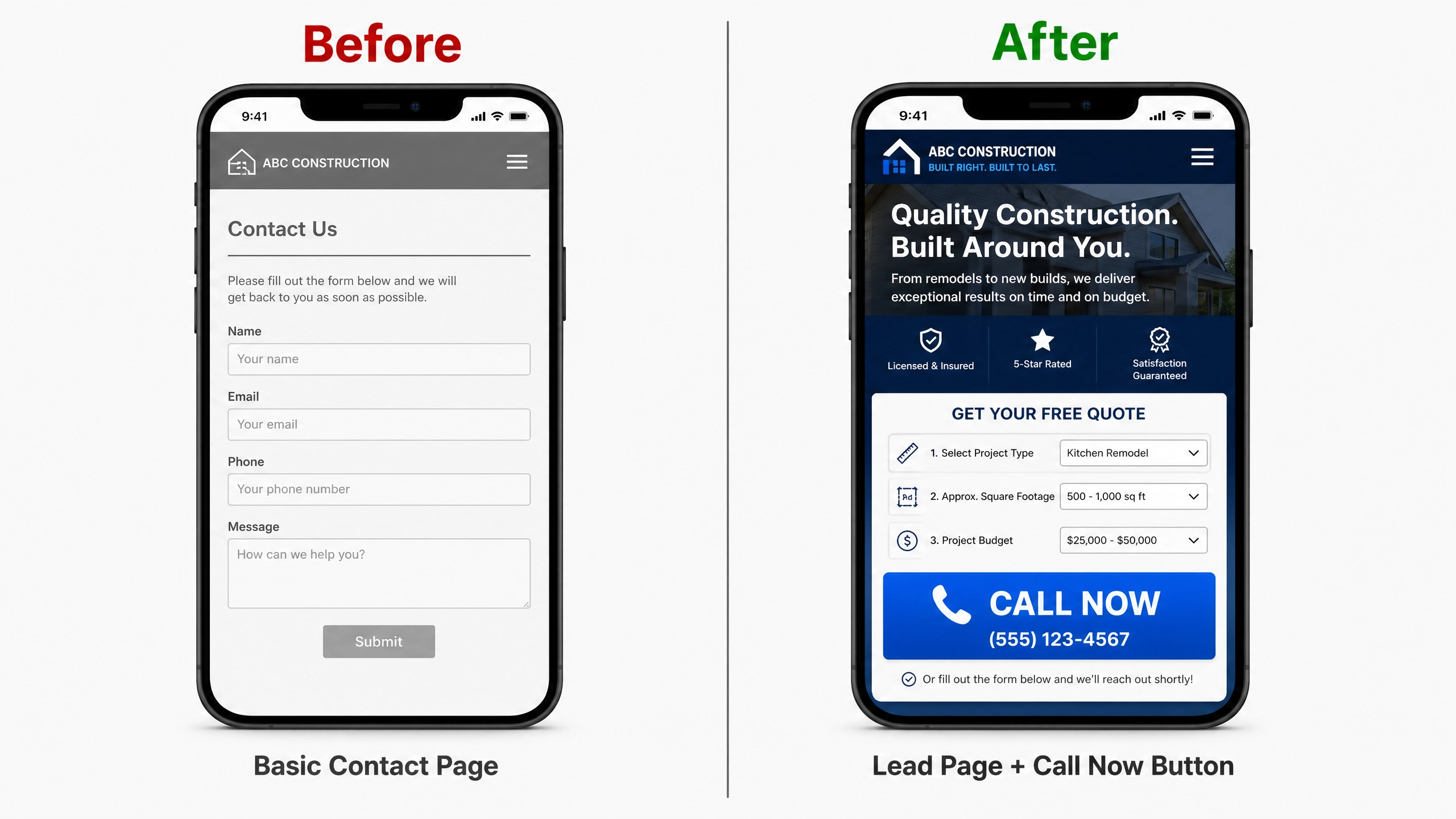
Right below the estimate, there’s an obvious Call Now button with your phone number. On mobile, it’s a tap-to-call button. The homeowner has a number in mind, they can see you’re local, and calling is the easiest next step. That’s the conversion point.
The page also includes a clear services list, a brief description of your company, and answers to common roofing questions in an FAQ section. Everything a homeowner needs to decide “I should call this roofer” is on one page.
See the Actual Roofing Demo Page
Instead of describing what the page looks like, you can see a working version right now. The roofing demo at Instant Sales Funnels shows exactly what gets installed on your site, with roofing-specific details throughout.
Roofing Lead Page Demo
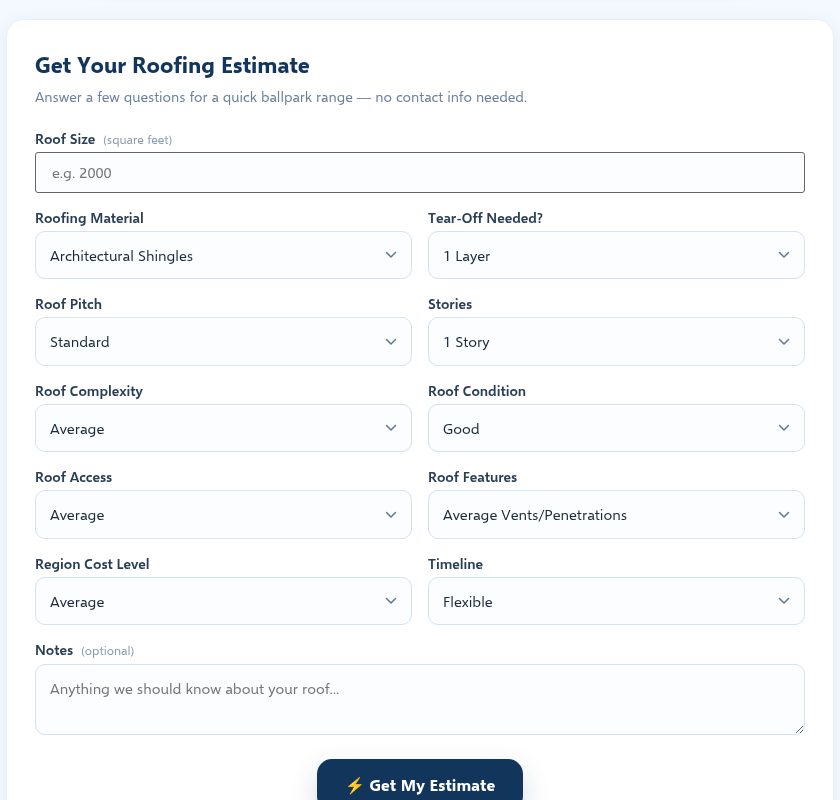
This is the full roofing lead page with the built-in calculator. The demo includes a Homeowner Mode (simple ballpark estimate) and a Contractor Mode (detailed job estimator with overhead, profit, and cost breakdowns). Your installed page is set up so visitors get the quick homeowner estimate.
The calculator covers: roof size in square feet, material type (3-tab asphalt, architectural shingles, designer asphalt, metal, tile, slate, flat/low-slope), tear-off options, roof pitch, number of stories, complexity, condition, access difficulty, penetrations and features, regional cost level, and timeline. Each field has sensible defaults. The homeowner picks what they know and skips what they don’t.
Plumber Demo (Same Structure, Different Trade)
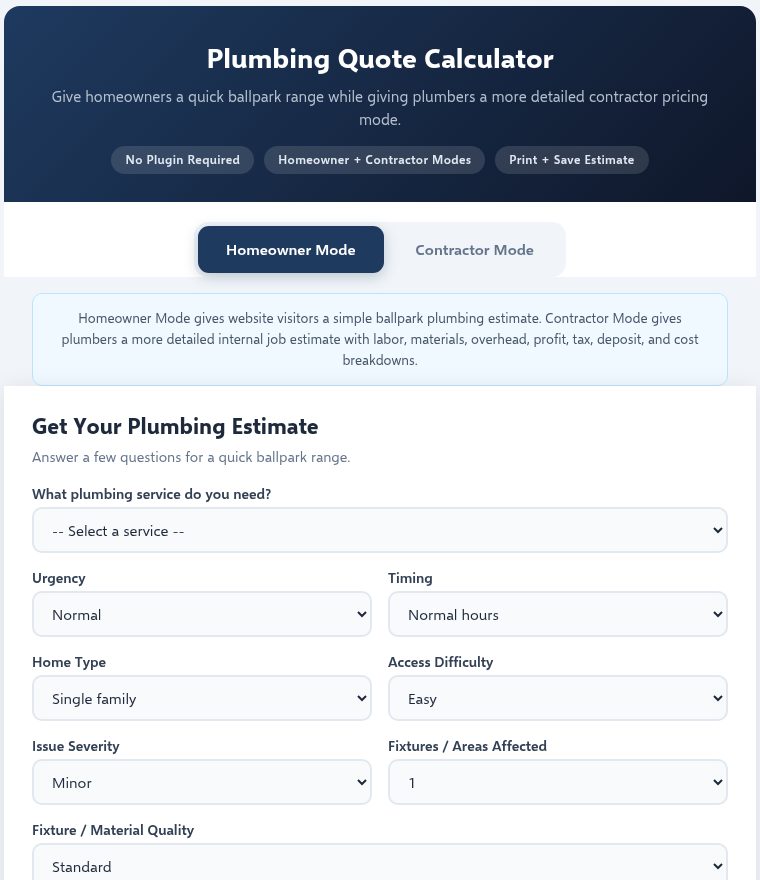
This plumbing demo shows the same page structure adapted for a different trade. Same layout pattern, same calculator logic, different service details and pricing assumptions. The point: this isn’t a one-trade template. The system works across contractor types.
Jay also has a remodeling demo that demonstrates the calculator for renovation work.
What Jay Handles in the Roofing Lead Page Installation
Here’s the exact scope of what’s included in the $397 installation. No surprises, no hidden fees, no ongoing charges.
What Jay Sets Up
- One roofing-specific lead page added to your existing WordPress website as a new page
- Your roofing company name, phone number, and service area placed throughout the page
- Roofing services list configured to match what you actually do: residential re-roofing, commercial flat roofs, storm damage, metal roofing, gutters, emergency tarping, or whatever your company offers
- Built-in roofing quote calculator with Homeowner Mode for visitor estimates
- Color matching to your existing website’s brand. Many roofing companies use red, navy, black, or dark green. Jay matches the lead page colors to what you already have, or works with colors you prefer.
- Mobile-responsive layout that works on phones, tablets, and desktop. The page adjusts to screen size automatically.
- Tap-to-call button with your phone number. On mobile, tapping the button starts a phone call. On desktop, the number is visible as text.
- Sticky mobile call button that stays visible as visitors scroll on their phone
- One basic revision after you review the installed page. If you want a different heading, a color adjustment, or a service added to the list, Jay handles one round of changes.
What You Provide
Jay needs a few things from you to set up the page. Nothing complicated:
- Your roofing business name
- Your phone number for the call button
- Your service area (city names, zip codes, or counties you serve)
- Your brand colors (or just say “match my existing site”)
- Your logo file, if you have one
- A list of roofing services you want displayed on the page
- Temporary WordPress login credentials (a temporary admin account, not your personal login)
What’s Not Included
- Full website rebuilds or redesigns
- SEO services, Google Ads management, or ongoing marketing
- CRM integration or email automation
- Multiple pages beyond the one lead page
- Ongoing maintenance or hosting
- Content writing for your entire site
This is a defined, focused installation. One page, properly built, with your details and a working calculator. That’s the job.
How the Roofing Quote Calculator Works on Your Website
The calculator is the centerpiece of the lead page, and it works differently from a contact form. Here’s why that matters for a roofing company.
A contact form says “tell us what you need and we’ll get back to you.” A calculator says “answer a few questions and see a price range right now.” The homeowner gets something useful immediately. They don’t have to wait for a callback, wonder if they can afford a new roof, or guess at what the project might cost. They get a ballpark number in seconds.
What the Calculator Asks
The roofing calculator uses configurable fields that reflect how roofing projects are actually priced:
- Roof size in square feet. The main variable. A 1,500 square foot roof costs less than a 3,500 square foot roof. Simple.
- Material type. 3-tab asphalt, architectural shingles, designer shingles, standing seam metal, tile, slate, or flat/low-slope membrane. Each material has a different cost-per-square-foot range built into the calculator.
- Tear-off vs. overlay. Removing an existing layer costs more than going over it. The calculator adjusts for no tear-off, one layer tear-off, or two layers.
- Roof pitch. A standard pitch is easier and cheaper to work on than a steep or very steep pitch. Steep roofs need more safety equipment and labor time.
- Number of stories. A two-story house takes more setup and equipment access than a single-story ranch.
- Complexity. A simple gable roof is faster than a roof with multiple valleys, hips, dormers, and intersecting planes.
- Condition and features. Decking repairs, access difficulty, number of penetrations (vents, skylights, chimneys), and regional cost adjustments.
What the Homeowner Gets
After filling in the fields, the homeowner clicks “Get My Estimate” and sees a price range: a low estimate, a mid-range estimate, and a high estimate. The page clearly states this is a ballpark based on general assumptions, not a binding quote. An actual price requires an in-person inspection of the roof.
That clarity is important. You’re not promising a $12,000 roof replacement and then showing up with a $18,000 proposal. You’re giving the homeowner enough information to know they’re in the right ballpark, and enough confidence to pick up the phone.
Why a Number Beats “Call for Pricing”
Most roofing websites say “contact us for a free estimate” and leave it at that. The homeowner doesn’t know if they’re looking at a $5,000 job or a $30,000 job. That uncertainty keeps them searching. They visit three more websites, compare nobody’s prices (because nobody shows prices), and eventually call whoever shows up first or has the most reviews.
When your website gives them a number, even an approximate range, you’ve answered their most pressing question. They stop searching. They call you. That’s the whole mechanism. The calculator doesn’t collect email addresses, doesn’t connect to a CRM, and doesn’t trigger automated follow-up sequences. It gives the homeowner a number and puts your phone number right next to it.
How the Installation Works (Start to Finish)
The process is straightforward. Most roofers have their page live within 48 hours after Jay has everything he needs.
- Contact Jay or pay directly. Call 608-322-4081, text him your website URL, or pay $397 through PayPal if you’re ready to go. Jay responds to texts and calls during business hours.
- Suitability check. Jay looks at your current WordPress site to make sure the installation will work. He checks your theme compatibility, page builder setup, and hosting environment. If your site isn’t suitable for any reason, you get a full refund before any work begins.
- You provide business details. Jay sends you a short list of what he needs: your business name, phone number, service area, brand colors, logo, and the roofing services you want listed. Takes about 10 minutes to fill out.
- Temporary WordPress access. You create a temporary administrator account on your WordPress site. Not your personal login. A separate temporary account that Jay uses for the installation. You can delete it after the work is done and you’ve reviewed everything.
- Jay builds and installs the page. He sets up the lead page with your details, configures the calculator, matches your colors, tests the mobile layout, and makes sure the call button works with your number. Usual turnaround is within 48 hours after receiving your details and access.
- You review and request changes. Once the page is live on your site, you look it over. If you want a heading changed, a color adjusted, a service added or removed, or any other basic tweak, Jay handles one revision.
That’s the whole process. No recurring fees, no monthly charges, no contracts. You pay $397 once, Jay installs the page, and it’s yours.
$397
One-time payment. No monthly fees. No contracts.
Your Roofing Lead Page Installation Includes:
- One roofing lead page added to your existing WordPress site
- Built-in roofing quote calculator (Homeowner Mode)
- Your business name, phone number, and service area
- Your roofing services listed and configured
- Color matching to your existing brand
- Mobile-responsive layout with tap-to-call
- Sticky mobile call button
- One basic revision after your review
- Usual installation within 48 hours
Suitability guarantee: If Jay reviews your site and determines it’s not suitable for the installation, you get a full refund before any work begins.
Who Might Need a Different Quote
The $397 installation covers one lead page with a roofing calculator on an existing WordPress site. If your situation is more involved, Jay can discuss it, but it may require a separate quote:
- Full website rebuilds. If you don’t have a website at all, or you want every page redesigned, that’s a bigger project than one lead page installation.
- Non-WordPress platforms. If your roofing website runs on Wix, Squarespace, GoDaddy Builder, or another platform, Jay reviews these case by case. Some platforms allow custom HTML, others don’t. Text Jay your site URL and he’ll tell you if it can work.
- Multiple pages. If you want separate lead pages for different service types (one for residential, one for commercial, one for storm damage), each additional page is separate from the base $397.
- CRM integration. If you need the calculator to connect to a CRM system, send automated emails, or save leads to a database, that’s custom development work beyond the standard installation.
- Large commercial roofing companies with complex quoting needs, multiple locations, or enterprise-level requirements may need a more involved solution.
Not sure where you fit? Text Jay your website URL and what you’re looking for. He’ll tell you straight whether the $397 installation covers it or if you need something different.
Roofing Lead Page Installation: Common Questions
These are the questions roofing contractors ask most often about the lead page and calculator installation. If yours isn’t here, text Jay and ask directly.
Can someone install a roofing lead page on my existing WordPress website?
Yes, that’s exactly what this service does. Jay installs a complete roofing lead page with a built-in quote calculator on your existing WordPress website. He doesn’t rebuild your site or replace your current pages. He adds one new page that’s designed specifically for roofing contractors, configured with your business name, phone number, service area, and the types of roofing work you do. The installation usually takes about 48 hours after Jay receives your business details and temporary WordPress access. Your existing pages, blog posts, and site structure stay exactly as they are. The new lead page is simply an addition that gives your website visitors a better way to get a roofing estimate and contact you.
What is a roofing lead page and why does it work better than a contact page?
A roofing lead page is a focused page on your website designed to turn visitors into phone calls. Unlike a generic contact page that says “fill out this form and we’ll call you back,” a lead page gives homeowners something useful immediately: a ballpark estimate for their roofing project. The page includes a quote calculator where visitors enter their roof size, material preference, pitch, and other details. They get an estimated price range in seconds, without creating an account or providing an email address. Right next to the estimate is your phone number and a call button. The homeowner has a number in mind, they know you’re a local roofer, and calling you is the obvious next step. A contact form asks the visitor to wait. A lead page with a calculator gives them a reason to act now.
How do I install a roofing lead page on WordPress myself?
If you want to do it yourself, you’d need to create a new page in WordPress, add the lead page HTML code, configure the quote calculator with your pricing assumptions, set up your business details, test the mobile layout, make sure the call button works, and verify that nothing conflicts with your existing theme or plugins. It’s doable if you’re comfortable editing WordPress code and troubleshooting CSS issues. Most roofing contractors would rather spend their time running their business than debugging website code. That’s why Jay offers the $397 done-for-you installation. He handles the technical work, you provide your business details, and you get a working lead page without touching code. If you’d prefer the DIY approach, the lead page kits are also available separately at InstantSalesFunnels.com.
Where do I hire someone to install a roofing lead page on WordPress?
You’re looking at one option right now. Jay Orban at Instant Sales Funnels installs roofing lead pages on existing WordPress sites for $397. The service includes the lead page, the roofing quote calculator, your business details, color matching, mobile layout, and one revision. You can also try freelance marketplaces, but you’ll spend time explaining what a contractor lead page is, reviewing portfolios, and hoping the person you hire understands roofing-specific needs. Jay has already built the roofing lead page template, has working demos you can see, and focuses specifically on contractor websites. Call 608-322-4081 or text Jay your website URL to get started.
What does a roofing website lead page installation include?
The installation includes one complete roofing lead page added to your existing WordPress site. Specifically: your roofing company name and phone number displayed prominently, your service area (cities, zip codes, or counties), a list of roofing services you offer (residential, commercial, storm damage, specific materials), a built-in quote calculator where homeowners can estimate costs, color matching to your existing website’s brand, a mobile-responsive layout that works on all devices, a tap-to-call button and sticky mobile call button, and one basic revision after you review the page. The installation does not include SEO services, Google Ads setup, CRM integration, full website redesigns, or ongoing maintenance. It’s a defined scope with a fixed price.
How does a roofing quote calculator work on a website?
The roofing calculator asks visitors a series of questions about their roof: size in square feet, material type (asphalt shingles, metal, tile, etc.), whether tear-off is needed, the roof pitch, number of stories, complexity, and condition. Based on their answers, the calculator applies built-in pricing assumptions and shows a ballpark estimate range, typically displayed as a low, mid, and high estimate. The calculator runs in the visitor’s browser. It doesn’t collect contact information, send emails, or connect to a CRM. It’s a static calculator that uses configurable assumptions to generate an approximate range. The next step is always to call or text the roofer for an actual quote. Jay configures the calculator’s pricing assumptions during installation based on general industry ranges appropriate for your area and services.
Does the roofing calculator give homeowners an exact price?
No, and it shouldn’t. The calculator provides a ballpark estimate range based on the information the homeowner enters and the pricing assumptions built into the calculator. Every roof is different, and an accurate price requires an in-person inspection. The page makes this clear with a disclaimer that the estimate is approximate and that an actual quote requires a site visit. This is actually a benefit for you as the roofer. The homeowner gets enough information to understand the general cost range, which qualifies them as a real lead. When they call you, they already have realistic expectations about pricing, which means fewer tire-kickers and more productive conversations.
Can I use the roofing lead page for Google or Bing ads?
Yes. The installed lead page is a regular page on your WordPress site with its own URL. You can point Google Ads, Bing Ads, or Facebook ad traffic directly to it. The page is designed to convert visitors into phone calls, which is exactly what you want from paid traffic. A focused lead page with a calculator typically converts better than sending ad traffic to your homepage, because the visitor immediately sees relevant roofing information and can interact with the estimate tool. Jay does not set up or manage your ad campaigns. That’s a separate service. But the page itself is ready to receive paid traffic from day one.
What roofing services can I list on the lead page?
Any roofing services your company offers. Jay configures the service list during installation based on what you tell him. Common services listed include: residential roof replacement, commercial roofing systems, storm damage repair, insurance claim assistance, shingle roofing (3-tab, architectural, designer), metal roofing, flat roof systems (TPO, EPDM, modified bitumen), tile and slate roofing, gutter installation and repair, emergency tarping, roof inspections, roof maintenance programs, skylight installation, ventilation and ridge vents, and soffit and fascia work. You choose what goes on your page. If your company specializes in residential re-roofing and storm damage and doesn’t touch commercial work, Jay lists only what you actually do.
Can the page show my service area?
Yes. Jay adds your service area to the page during installation. You can list it however makes sense for your business: specific city names, a list of counties, zip codes, or a general geographic description like “serving the greater Milwaukee area” or “all of Dane County and surrounding communities.” The service area appears on the page so homeowners can immediately confirm you work in their area. This is especially useful if you’re running ads, because someone clicking your ad from outside your service zone can see right away whether you cover their location.
Do I need to rebuild my whole roofing website?
No. That’s the whole point of this service. Jay adds one new page to your existing WordPress site. Your homepage, about page, gallery, blog, and everything else stays exactly as it is. The lead page is simply a new addition. Think of it like adding a new room to a house instead of tearing the house down and rebuilding it. If your website is functional and running on WordPress, the lead page can be added to it. If your site has serious technical problems (malware, broken themes, outdated WordPress version), Jay may identify those during the suitability check and let you know before proceeding.
What colors and branding can be matched for a roofing company?
Jay matches the lead page colors to your existing website. If your roofing company uses red and white, the lead page uses red and white. If you use navy and gray, that’s what the page reflects. Many roofing companies use combinations of red, navy blue, black, dark green, or orange. Jay looks at your current site, identifies your brand colors, and applies them to the lead page so it looks like a natural part of your website, not a foreign add-on. If you don’t have strong brand colors or you’re not sure what you want, Jay can suggest a clean, professional color scheme that works well for roofing companies. You also provide your logo if you have one, and it gets placed on the page.
How does a roofing calculator help qualify leads before I call them back?
When a homeowner uses the calculator and sees a ballpark estimate, they’re self-qualifying. If they see a range of $10,000 to $16,000 for their roof and still call you, they’ve already mentally accepted that price range. Compare that to a lead from a contact form: you call them back, spend 20 minutes on the phone, schedule an inspection, drive to their house, and then present a quote that shocks them because they were expecting $3,000. The calculator gives homeowners realistic expectations before they contact you. The leads that do call are better informed and more likely to move forward. You spend less time on quotes that go nowhere and more time closing jobs with homeowners who understand what roofing work costs.
Does the installation work for both residential and commercial roofing companies?
The standard installation is designed primarily for residential roofing companies and contractors who do both residential and light commercial work. The calculator assumptions and page layout are geared toward homeowners getting ballpark estimates for residential roofing projects. If you’re a commercial-only roofing company with complex needs (multi-unit buildings, government contracts, specialized membrane systems), the standard $397 installation may not fully cover your situation. Jay reviews these on a case-by-case basis. If you’re a residential roofer who also does commercial work, the lead page can list both categories while the calculator focuses on the residential estimate side.
What WordPress access does Jay need and how do I keep it secure?
Jay needs a temporary WordPress administrator account to install the lead page. Here’s the secure way to handle it: go to your WordPress dashboard, go to Users, click Add New, create a new user with an administrator role using a temporary username and password. Give Jay those credentials. Do not share your personal login. After the installation is complete and you’ve reviewed the page, go back to Users and delete the temporary account. This is standard practice for any WordPress work done by someone outside your organization. Jay only needs access long enough to install the page and make your revision. He doesn’t need ongoing access to your site.
What business information do I need to provide for the roofing page setup?
Jay needs your roofing business name (as it should appear on the page), your phone number for the call button, your service area (cities, counties, or zip codes), your brand colors (or a link to your existing website so Jay can match them), your logo file if you have one (PNG or SVG preferred), and a list of roofing services you want displayed. That’s the core information. Most roofers can put this together in 10 minutes. If you have specific messaging you want on the page (a tagline, a brief company description), you can include that too, but it’s not required. Jay writes the default page copy to be clear and professional.
How long does it take to get my roofing lead page installed?
The usual turnaround is within 48 hours after Jay has three things: your payment, your business details, and your temporary WordPress access. The 48-hour clock starts when all three are in hand, not when you first make contact. If you text Jay on Monday morning, pay on Monday afternoon, and send your business details and WordPress access Tuesday morning, your page should be ready for review by Thursday morning or sooner. Delays usually happen when the roofer hasn’t sent business details or created the temporary WordPress account yet. The faster you get Jay what he needs, the faster the page goes live.
What if my roofing website is on Wix or another platform?
The standard $397 installation is for WordPress websites. If your roofing site is on Wix, Squarespace, GoDaddy Website Builder, or another platform, Jay reviews these on a case-by-case basis. Some platforms allow custom HTML embeds that could work. Others are too locked down. The best approach is to text Jay your website URL and tell him what platform you’re on. He’ll look at it and tell you honestly whether the installation can work or if you’d need a different approach. If your site isn’t suitable, there’s no charge. Jay doesn’t take payment for work he can’t do.
Ready to Get Your Roofing Lead Page Installed?
Text or call Jay with your roofing website URL. He’ll look at your site and tell you if it’s a good fit for the installation. If it is, you can pay $397 through PayPal and have your roofing lead page live within 48 hours.
608-322-4081
Want to see what you’re getting first? Open the live roofing demo.